Steve PMH
Musical terms are easy at first, but once you go deep inside, you start seeing 3-lettered words like VST and DAW. And unless you know what they stand for, your first trial at mixing music won’t be as fun as you thought it’d be.
But what does VST stand for? It could be vehicle safety technology, right? Or maybe virtual screening technology?
Well, it’s neither this nor that. It stands for Virtual Studio Technology.
Great, but that still hasn’t answered your question: what is a VST?
Read on to find out!
What Is a VST?
A VST is a plugin that works within the DAW. If you’re new to music, DAW stands for the digital audio workstation—a piece of software that you use for mixing, recording, and producing music in both professional and home studios.
VSTs are made to emulate the sounds of samplers, hardware synthesizers, and different instruments. They mostly sound as authentic as the real thing, but that’s if you know how to use them correctly.
VST plugins are designed for use inside DAWs, but other types work within musical instruments and audio recording devices. Meanwhile, others work as stand-alone.
For example, VST instrument plugins, or VSTi’s for short, are used to insert virtual instruments into your music without actually having the physical gear. So, you’ll be able to add and alter the instrument’s sound without even having it. Cool, isn’t it?
What Are Plugins in Music?

The word plugin caught your eye, didn’t it?
Well, you’ll see it a lot in the music recording world, so let me give you a brief overview of musical plugins and what they’re used for.
When you’re working with hardware, you add effects using inserts that are commonly found on mixing desks. These inserts convert the audio signal via the effect box and return it to the mixer in its new sound.
To apply the same mechanism on musical software like DAWs, you need to have a virtual mixing desk and virtual inserts, which come in the shape of buttons. When you click on the buttons, you insert an effect—a VST effect.
In other words, you’ll be plugging an effect into your audio channel. In this case, you can call that software effect a plugin.
What Are VST Plugins Used For?
VST plugins are mainly used to compensate for the physical instruments that you don’t have. Nowadays, you can’t buy any instrument that you want to add to your song—simply because musical instruments are getting more expensive every day.
On top of that, you’ll need a skilled musician to play it, and it still may not deliver the effect you’re seeking for. Not to mention, musical instruments take up a lot of room, and you probably don’t have enough storage space.
The VST plugins provide reverb, compression, and similar effects that you don’t have the physical instruments for. They make up for synthesizers, instruments, and nearly all effects hardware equipment.
These plugins allow you to create songs from the bare scratch if you know how to use your DAW right. You don’t need a single instrument to record a song.
The Different Types of VST Plugins

There are three different types of VST plugins; here’s a brief of each of them:
- VST effects: You can use these plugins to modify your audio, but you can’t use them to create audio from scratch. They’ll add effects like reverb and feedback.
- VST instruments: You use these plugins to imitate the sounds of a synthesizer. They also generate the sounds of traditional musical instruments, including guitars and pianos.
- VST MIDI effects: You can use these plugins to connect compatible instruments to DAW software using MIDI connection. They mainly work with MIDI data or with other types of VST plugins.
Here’s a detailed overview of each of these types:
VST Effect Plugins
VST effects plugins are designed to alter your audio and adjust it in any way you like. So, the process goes as follows: you create your sounds from scratch using a VST instrument plugin, then you apply effects and alterations to your song using a VST effects plugin.
Like VSTi’s, VST effect plugins are also based on the sounds of physical hardware.
It’s also worth noting that most DAWs already have built-in generators for such effects, but those are only suitable for amateurs and musicians who don’t depend largely on effects. VST plugins take your recording to the next level, and they provide fine-tuning that’s hard to get using the DAW alone.
A VST effect plugin can get you any kind of effect you can think of. A reverb, compression, pan, or synth sounds—everything is possible.
VST Instrument Plugins

You’ll commonly see VST instrument plugins referred to as VSTi’s for sort. These fellows are used to mimic the real sound of musical instruments—all within your digital audio workstation software.
Any instrument you can think of, the VST instrument plugin will be able to emulate its sound. Of course, that’s for much less than the actual cost of the instrument.
The reason VSTi’s are widely sought after is that they enable you to create sounds from scratch. Not only that, but the audio will also sound exactly like the physical instrument would sound, which is a huge bonus because it’s for much less money.
VSTi’s can also emulate globally popular synths that musicians love, including but not limited to the Hammond B3, the Moog Voyagers, and the Yamaha CS-80. That way, you can create their iconic sounds without actually buying them.
As you probably already know, these synths are so expensive. Luckily for you, you don’t have to pay for them to have their sounds in your song—all thanks to the virtual studio technology.
Lastly, VSTi’s are highly convenient because they help you compress your working space. If you have the right VSTi plugins, you can do your whole recording process on one computer. Of course, that’s an invaluable quality for home studios because you likely won’t have enough space for real musical instruments and synths.
VST MIDI Plugins
The first thing you should know about VST MIDI plugins is that they don’t create audio, and they’re not designed to do so. Instead, they’re created to work with MIDI, or Musical Instrument Digital Interface, data.
When you have a VST MIDI plugin, you’ll be able to process MIDI data and modify it as you need. In addition to that, you’ll be able to pass it on to other plugins you’re using for recording.
These plugins can adjust the sound of MIDI compositions so that they sound natural or authentic. As powerful as MIDI tools may be, their compositions may still sound unnatural, especially to professional ears. Here, you can use a VST MIDI plugin to get the audio to sound more natural.
How Are VST and MIDI Related?

If you’re not familiar with MIDI, or Musical Instrument Digital Interface, it’s basically a technical communication standard that allows the musical gear you’re using to speak in the same language. So it’s a bunch of electrical connections and communications protocol that keeps all your musical instruments, audio devices, and computers connected.
As you’ve probably caught on by now, MIDI is the communication standard of your VST plugins. So, for example, your VSTi’s will be loaded in your digital audio workstation on a MIDI track.
For that plugin to create audio, it needs to respond to MIDI data that’s coming from your DAW.
Likewise, you use MIDI controllers to control your VST effects parameters. This comes incredibly in handy during live performances.
So generally, MIDI is the protocol that allows VST plugins to be used and understood by your musical gear. If you have VST MIDI plugins, you’ll be able to edit MIDI data and process it to other plugins.
How to Use VST Plugins to Get the Effects You Desire
Some VSTs are designed to operate on their own, but the larger variety only works within a digital audio workstation software. So to use the VSt plugin you want, you’ll need to first install a DAW to work on. There are some free options available, but the paid software typically offers more options and advanced features.
To get started with any VST plugin you want, follow these steps:
- Find the VST plugin that you want to use for mixing, and download it on your computer.
- The file will likely be zipped, so unzip it and place it in a folder you can easily access.
- The plugin may have an executable file. In this case, you’ll need to run it to use the VST.
- The installation process starts here, and the computer will ask you to choose an installation folder.
- Now, launch the DAW of your choice, and you use it to select new VST plugins from your computer. This step varies according to the DAW you’re using, but it should be easy enough.
- Start mixing and producing music by creating a new project in the DAW software. When you need to add a specific instrument’s sound using your VSTi, select it as a new plugin. You’ll then be able to use its effects on your song using the audio mixer.
What Is VST Hosting?
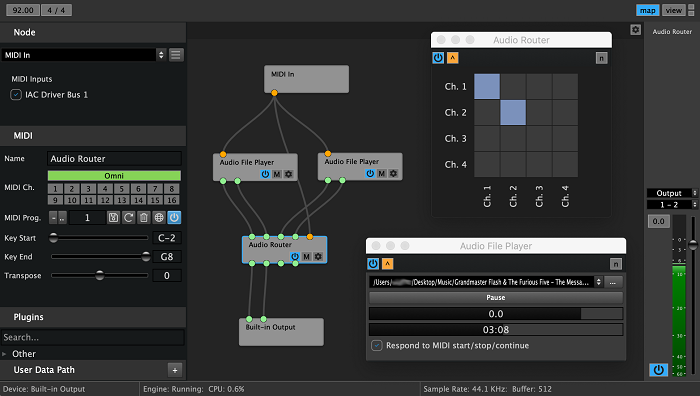
To get a full understanding of VST plugins, you need to be familiar with all related terms. For example, you’ll hear the word VST hosting a lot, so let me explain what it means.
Your digital audio workstation typically hosts the VST plugins of your choice. That way, you can send the MIDI and audio input from the software to the VST plugin you want, so they can be processed.
After that’s done, the plugin either sends the output back to another VST plugin for more effects or directly to the DAW software for finalizing your audio file.
For you to use the VST plugins in the DAW, they should be hosted, and most people think you must install the plugins on the DAW for that step. Meanwhile, you only need to configure the DAW software you’re working on so that it can look for plugins on your computer.
This way, you host the VST plugins without installing them.
The option is available in all DAW software that is compatible with VST plugins, so you don’t need to worry about whether you can do it or not. You’ll mostly find it in the Options menu.
If you want examples, some popular, renowned DAW software like Sony Acid Pro and Ableton Live support VST plugin hosting.
How Are VST Files Saved on Your PC?
When you install VST plugins on your computer, they come as single files. Mostly, plugins are installed as DLL files on PCs. When you want to direct your DAW to the VST file, you add the plugins you need to use in the same folder.
On the other hand, if you have Mac OS X, you’ll find your plugins called Audio Units when you install them. They’ll have a .au extension, and no, that’s not Australian!
To use the Audio Units file as a VST plugin, you’ll need to use a buffer program, otherwise called a wrapper because it wraps the .au file in a code that makes it recognizable to your software.
Difference Between Inserts and Send Channels

There are several places to put your VST plugin, depending on the DAW software you’re using. You can either use your VST plugins as send channels or inserts.
When you decide to use your VST plugin in a send channel, you’ll be able to send any of your audio tracks to the channel and process them through it. That way, you’ll be able to apply effects to multiple audio channels at once. Even better, you’ll be able to create a mix of a channel’s audio output and processed output.
On the other hand, if you use your VST as an insert, you’ll find it placed in the audio channel of one specific track. This means it’ll put changes on the track before it gets sent anywhere, and not on all tracks.