 Steve PMH
Life has gotten really busy and this is just as true for musicians as it is for everyone else. It’s harder to find time to get everybody together in the studio to lay down a track.
Soundtrap provides an online environment for collaborating with artists no matter where in the world they are located. There’s finally a cloud-based DAW with all the essentially that actually works as intended.
Want to know what made an app so good that it became one of Spotify’s biggest ever purchases? Here is our review of Soundtrap.
Get to Know Soundtrap
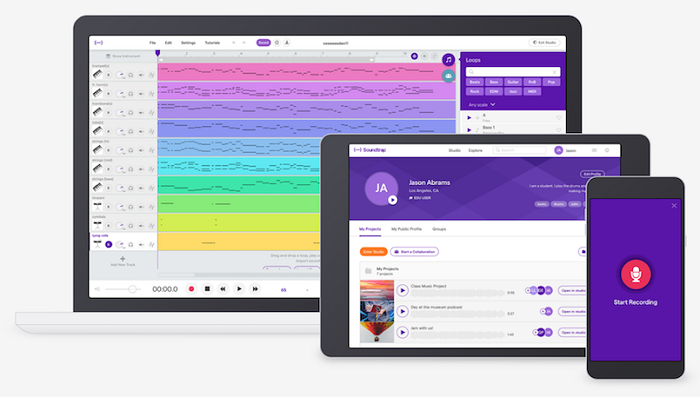
Soundtrap was founded in Stockholm, Sweden. As the story goes, in 2014, a group of four musicians found that it was just too difficult to make music together. Soundtrap aimed to fill a gap that allowed musicians to work together even when they couldn’t share a studio.
Soundtrap kept adding new products and features over the years. The team behind this app paid close attention to helping students and people new to working with a DAW. This app was sold to Spotify in 2017.
To date, this has been one of Spotify’s biggest purchases. The year Spotify bought Soundtrap, the app had made over 900,000 Swedish kroner. How has all of this success continued over the years?
Soundtrap is still just as popular. Now that it’s part of the Spotify family of music-related projects, it’s only gotten bigger. There are thousands of active users for Soundtrap and most ratings on Google Play and the Apple App Store are four stars or higher.
What Does Soundtrap Offer
Soundtrap offers just about everything the home recording artist needs to complete a track. You get everything from premade loops and a library of sounds to an easy to navigate DAW for working with other artists. Let’s go feature by feature and explore what Soundtrap has to offer.
Social and Cloud Features
Starting off with what sets Soundtrap apart, we’re going to take a look at the social, collaborative, and cloud features that come with this application.
When you’re collaborating with other artists, you’ll have access to voice and video chat that helps make the collaboration process all that much easier. You can chat with each other in real-time about the edits you’re making to the track as well as what you need from each other in order to complete the music that you’re working on.
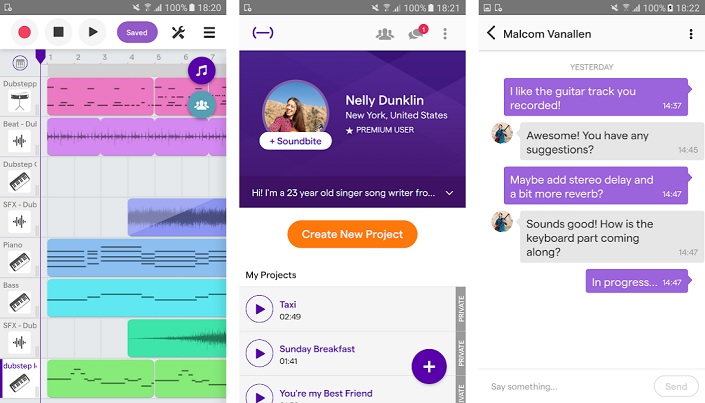
All projects are saved to the cloud. This means that you can access your Soundtrap projects from any computer anywhere in the world. This is especially appealing for students who are working in shared spaces at their university.
You can tag a new artist into a project at any time. All you need to do is click the invite button and send your collaborators an invite via email or directly to their Soundtrap profile.
Music Editing Features
This wouldn’t be a review of a music editing app without talking about all of the features that come packed into Soundtrap. Artists will be able to find everything from in-depth tools necessary for designing contemporary pop music all the way over to the basics for producing a simple, clean track. Here’s what you get with Soundtrap:
- You can connect your own amps, guitars, and other instruments
- Antares Auto-Tune
- Thousands of pre-set loops ready to play
- Thousands of instruments from synths to drum machines
- Automation features for adjusting pan, sweep, and more
- An intuitive sequencer for making beats
Those are just the basic features you’d expect to come with any DAW. There’s a few more bells and whistles baked into Soundtrap that make it stand out.
Soundtrap Capture
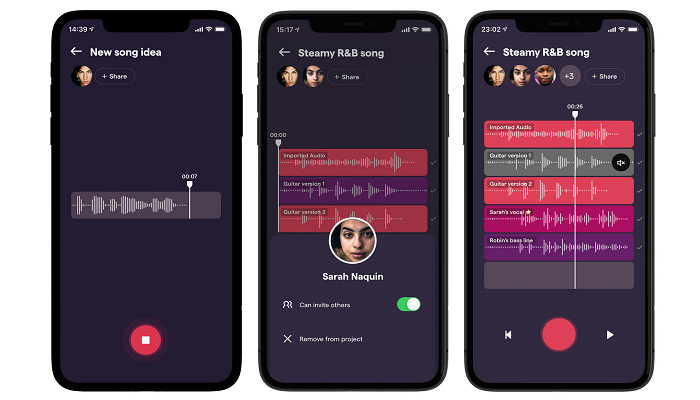
Soundtrap Capture is a unique feature of this app. Soundtrap Capture is actually a standalone app that comes with your Soundtrap account. You can use this app to quickly draft songs with the artists you are working with.
The app lets you collaboratively “hang out” in a shared space while uploading beats, vocals, and instrumentals into a stripped down DAW. There’s no fancy features here, just all the basics, so you can outline your next hit before taking it over to the other side of the Soundtrap app.
Soundtrap Storytellers
This is an interesting feature that comes with Soundtrap that gives you something a little bit more to do in between recording songs. Soundtrap Storytellers is a feature designed specifically for podcasters. Whether you want to make a podcast about the music that you love and create or a podcast about what you had for lunch, Soundtrap gives you the tools to get it going.
Soundtrap Storytellers comes with a host of features designed to make podcasting easier. You can manage your guests, adjust audio tracks, and even create a jingle all inside of this app. This might not be a make-or-break feature for musicians, but it is nice to know that you’ve got some extra utility in case you need to do some non-musical recording.
Soundtrap for Education
One of the features that causes Soundtrap to stand out in a crowded field of online DAWs is that it has a focus on education. Soundtrap for Education is designed for the classroom whether that’s for high school students or University students.
Plenty of musicians are also educators. Soundtrap offers a way to help music students create songs in a streamlined environment. This could be a great alternative when working with students who don’t already have access to recording studios and expensive DAW equipment.
How Soundtrap Works
Let’s walk through using Soundtrap from first signing up all the way through making a track with another artist.
It all starts with signing up for Soundtrap. You, and any artists you are working with, are all going to need your own Soundtrap accounts.
Soundtrap offers a few different plans designed for artists with specific styles or basic plans for podcasters. You can even sign up free of cost to unlock the base features for a “try before you buy” recording session.
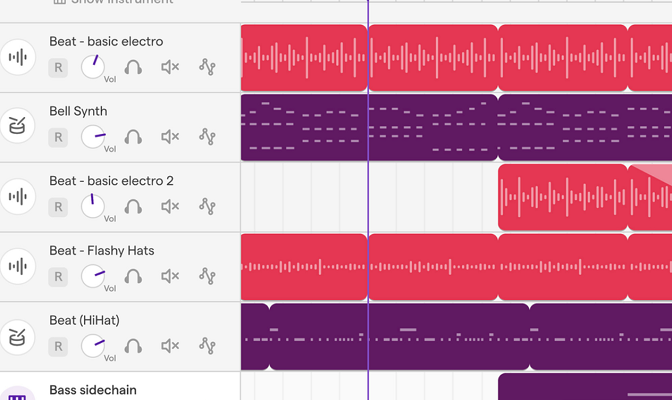
After you’ve set up your account and signed in, you’ll be dropped into Soundtrap’s DAW. Now, DAWs have a reputation for being absolutely maze-like and overly confusing for new users. Soundtrap takes a different approach and provides a streamlined DAW that is very intuitive.
Artists who are new to working in a DAW will be able to get onboard with Soundtrap’s features very quickly. You can even browse the Soundtrap tutorial library to find videos and other guides meant to help new users find their way around. It’s a very lightweight program, so don’t expect all the features of an expensive studio DAW, but it has more than enough to get the job done.
Alright, you’re ready to go with your first Soundtrap session, and you need a beat. You can use the loops, drum pad, and midi keyboard to lay down the bones of your first track.
These features work just as well as they do in big-budget DAWs. You’ll be able to create custom beats with the sequencer and add layers of effects.
Creating Music Together
What makes Soundtrap stand out isn’t just its lightweight DAW, but the collaborative features. You can invite other artists to help you record your track.
All you need to do is hit the “invite” button, and you can tag friends by their username or email. It’s worth talking about how the collaborative feature works in-depth.
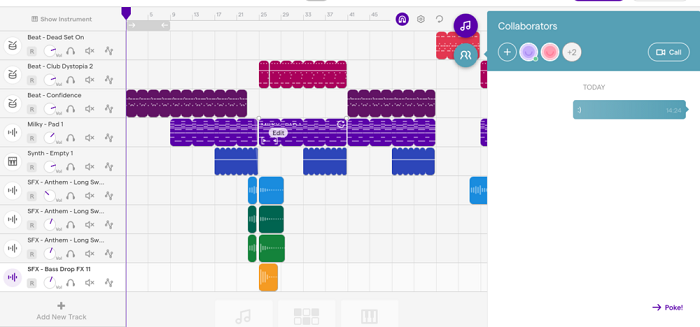
You can collaborate with as many artists as you need to create the track that you want. You can invite artists to play instruments, sing, or any other creative expression you can think of. Artists can add tracks, make changes, and record their vocals and instruments into the shared project.
The big thing to keep in mind is that changes do not appear in real time. You’re going to need to save and synchronize in order for changes to show up. This takes a little bit of getting used to it especially if you’re trying to collaborate with several artists at once.
Luckily, there’s a built-in way to help you navigate this issue. This app comes with its own video chat feature which allows you to talk with the artist you’re collaborating with. This can help you streamline the project and helps make it feel more like you’re jamming in the studio together rather than over the internet.
Cross-Platform and Connectivity
Another significant plus to Soundtrap is that you’ll be able to work cross-platform with the artist you want to collaborate with. This app works on Android, Apple, and as a web-based application. All you really need is your musical talent and a solid internet connection to make Soundtrap work for your needs.
Many reviewers have called this application the “Google Docs” of music DAWs. Once you get working with your team, you’ll find it really does have a similar feel.
This might not sound like a compliment for music buffs, but Docs is very good at what it does and so is Soundtrap. If you’re looking for a cloud-based platform to record and mix music, Soundtrap has you covered.
Editing, Recording, and Mixing
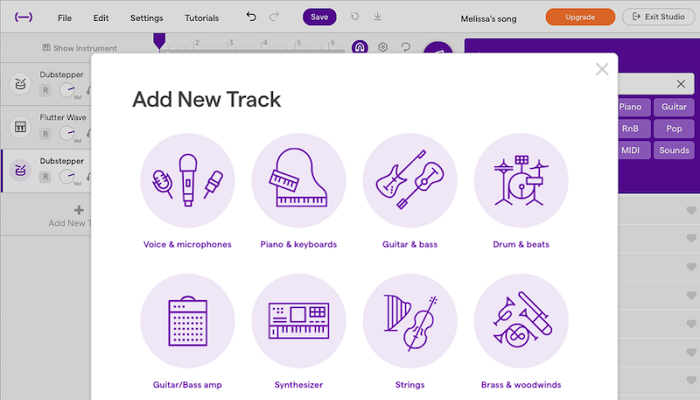
You’ve set up your account, you’ve got the whole band working together, and now it’s time to edit, record, and make your track. Soundtrap offers plenty of features that allow you to weave your music together without ever having to step foot in the studio.
You’ll find automation, loops, and even auto-tune features built into this app. You can tweak the song you’re working on as long as you like and export it when you’re done.
Copyright and Ownership
This is a big one. We’ve all read social media terms of service that sneak in wording that suggests that the social media app owns all of the content that we post. There’s a big concern among musicians who are posting their work online and worried that a company might take advantage of their talents.
We went ahead and checked the terms of service with Soundtrap. You have full ownership and copyright over the music you create with this application. This is unless you have a contract with a studio or label, but most artists working with Soundtrap are going to own all of the music they create with this app.
Soundtrap Pros
- Video chat feature while collaborating
- A huge library of loops, drums, instruments, and beats all ready to go
- Easily collaborate with artists no matter where you are located
- Education options are great for students and teachers
- You can make professional-level songs with this app—provided you have the skills
- Good terms of service for musicians
Soundtrap Cons
- All of your work exists on the cloud, which means you’re at the mercy of Spotify’s servers
- You’ll get the best results with a strong internet connection
- Ideal for distance work, but you’ll need another system in place for recording a whole band in the studio
- Asynchronous edits don’t appear in real-time—only after saves
Our Soundtrap Verdict
Soundtrap is an online DAW that helps musicians collaborate when they can’t get together in a shared physical studio. It offers plenty of editing features ranging from auto-tune to drum machines. The app also easily integrates with the instruments that you play as well as vocal recording equipment to make collaborating on a track very easy.
Soundtrap’s other features, like Soundtrap for Education and Soundtrap Storytellers, are an icing on the cake that add more utility to an already useful app.
Our verdict for Soundtrap is straightforward: You should download this app if you’re looking to collaborate with other musicians, but you can’t get together to work in the same physical space. Soundtrap is here to finally offer a solution for musicians who have to overcome distance to make the tunes they love.
You can check out Soundtrap’s different plans and pick the one that’s right for you and the artist your work with.