Steve PMH
Have you been looking for a website that supports every stage of the music creation and recording process, absolutely free? Today, we’ll be taking a look at BandLab, an impressive site that offers a free DAW, royalty-free sounds and loops, and free mastering.
Today, we’ll be focusing primarily on the mastering side of BandLab. Is it right for your music? Let’s find out.
👉 Click Here to Discover the 8 Hottest Online Mastering Services Right Now!
About BandLab
BandLab was founded in Singapore. The founders believed that technology, while it has been somewhat helpful to creative endeavors, has actually made the creative process more fragmented. BandLab, founded in 2014, was intended to make music creation more streamlined and inspirational.
When considering what BandLab has to offer, it’s important to note that it is still in relative infancy. Regardless, it’s already made some pretty big waves — the company was awarded Microsoft’s Start-Up Partner of the Year award in 2016.
BandLab continues to expand and grow, and it continues to offer valuable opportunities for musicians — even those on a tight budget.
The Main Features and Benefits
BandLab is a site with a lot going on, and we can see how it could be overwhelming for those new to online music creation sites. However, today we’ll primarily focus on the mastering side of things.
Mastering
One of BandLab’s biggest draws is its mastering section. We’ll get into more detail on how to master your tracks in the next section, but we think this part is especially important because there are no limits on the tracks you can master for free.
Understanding Limitations
On the BandLab blog, the site creators clarify that BandLab mastering is not a substitute for a dedicated sound engineer. However, more and more musicians are finding themselves in charge of producing, mixing, and mastering their own tracks.
For musicians who don’t have a lot of mixing experience and who have little to no budget, though, BandLab’s mastering provides a professional-sounding result without the cash outlay.
What’s in the Algorithm?
In a press release from 2016 (when BandLab mastering was unveiled), the BandLab team details what went into their mastering algorithms.
Essentially, the mastering program is based on emulations of pre-existing mastering processors. Notably, part of the algorithm is based on the Aphex Aural Exciter, a rare tube-based unit that adds depth and vibrancy to recorded tracks. Multi-band compressions and use of a mastering limiter also give your tracks some extra polish.
The Mastering Interface

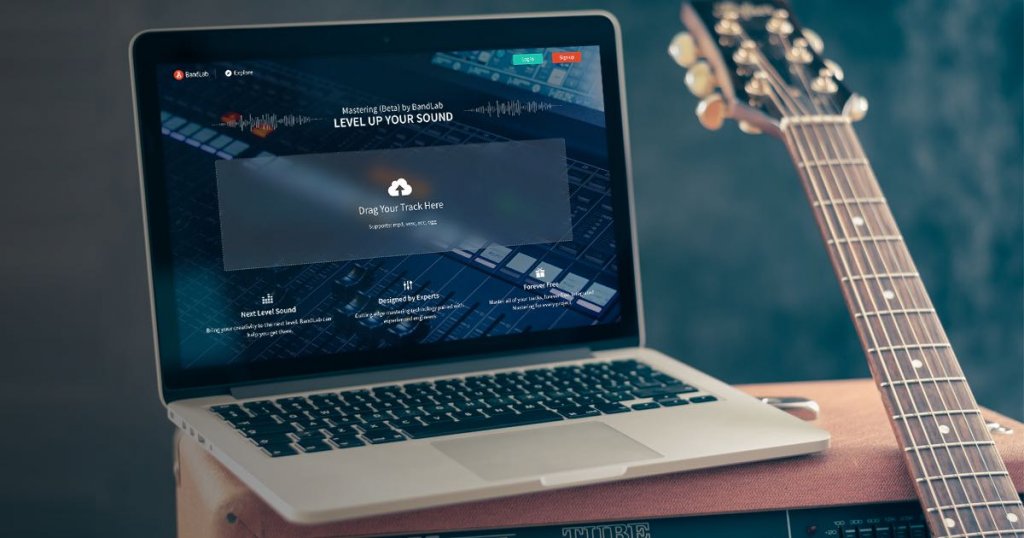
BandLab has one of the most intuitive mastering interfaces that we’ve found. Once you’re on the mastering page, you just need to upload the track you want to master. BandLab makes uploading especially easy — there’s an option to drag and drop the files you want to master.
The interface has three presets for mastering, and each is represented by a colorful icon. The interface itself does not include an explanation of what each preset entails. However, the above-mentioned press release does explain what’s behind each setting:
- CD quality– This is a setting that can be applied to just about every genre. It boosts volume while maintaining clarity. BandLab says it can add some extra “polish” to your track.
- Bass boost– This one is designed with rap and EDM tracks in mind. It helps bring out bass frequencies for a punchier low end.
- Enhance clarity– While this preset was designed with pop songs in mind, it can be applied to any song that needs some brightness. It makes each layer of a song stand out, which can be good for audio projects with several different tracks.
Device Compatibility
You might assume that a mastering program would only work on your browser. But while BandLab notes that it’s easiest to use their site in a web browser, you can also use it in app format. We like that the BandLab app is available in both iOS and Android formats.
If you want to use BandLab’s free DAW (digital audio workstation), Cakewalk, you can download the site’s free Desktop Assistant for Mac or Windows. This is a DAW that’s designed to be easy to use, even for those with little to no recording experience.
It also integrates seamlessly with BandLab’s mastering service so your songs will be distribution-ready in no time. Now, let’s take a look at all the other features BandLab has to offer:
The Free DAW
If you’ve been recording music for any length of time, you know that a DAW you feel comfortable with key to creating good music. However, some popular DAWs (like ProTools) are somewhat costly.
Part of BandLab’s mission is to break down barriers, and they’ve been able to do that thanks to their 100% free DAW. The DAW, which you can find under the “music creation” tab on BandLab’s site, can run in a Chrome browser, and it’s also available as an Android and iOS app.
Few DAWs are this accessible, and while the BandLab DAW might not be as comprehensive as some of the more expensive options, we think it’s a great way to make music on the go. The BandLab DAW comes with virtual instruments, amp simulators, and effects for vocals, guitar and bass.
It also comes with proprietary pitch-correction algorithms, which provide a great value — mist pitch-correction plugins are very expensive. Plus, all projects are saved to the BandLab cloud, so you don’t have to worry about losing your progress.
Sound Library and Web Audio

BandLab has a unique web audio section. You can use this section while recording in the DAW, or even as a stand-alone musical exercise. The web audio section lets you play a variety of software instruments, including keyboards and drumsets, using only your computer keyboard.
But if you want, you can also connect a MIDI device and control them that way. Software instruments can take awhile to get the hang of, but they can be a great addition to your recordings (and they’re also fun to play on their own).
You also can access a royalty-free library of sounds and loops. This is a great resource whether you’re recording music to release professionally or just want to experiment with music production.
The Blog
Part of BandLab’s focus is on creating a community, so the site has an active blog. This blog may actually be a good place for those new to BandLab to start, as it’s full of helpful tutorials.
For example, when you first visit the blog homepage, you’ll see a tutorial for how to make a vaporwave beat, how to produce a Marshmello-style beat, and how to create a reggaeton beat in the DAW. There are also some interesting behind-the-scenes looks, including a piece about how the sounds for the BandLab sound library are made.
The Store
BandLab is 100% free, and that’s part of why we like it. However, the site has expanded to include a store. So far, the store is pretty small, but it offers something that’s fairly rare: the opportunity to purchase a great-sounding audio interface for a great price.
All of these audio interfaces are portable, and you can even connect them to a phone to record. Best of all, you can purchase an analog or a digital interface. A potential downside is that these interfaces only have one input, but that does make them easier to take along with you.
How Does It Work?
The mastering portion of BandLab is surprisingly simple. When you go to their mastering page, you’ll see a box labeled “Drop Your Track Here.” We like that virtually every file format is supported.
You can upload the following file types:
- mp3
- m4a
- wav
- aac
- ogg
Once you upload, the mastering process is virtually instant. We tried it and it took maybe 30 seconds at most. But our favorite part is that, once the track is mastered, BandLab takes you to a screen where you can preview the track.
Even during the same preview, you have the option to change mastering presets. There are three to choose from bass boost, enhance clarity, and CD quality. You can also listen to your original uploaded track, which can be a great way to see how much the master has changed its sound.
If you want to download your mastered track, you do need to make a BandLab account. However, this is free, so it likely won’t pose a problem for most musicians.
You also have unlimited masters, which offers another advantage: if you wish, you can download different versions of the same track (mastered with different presets) and decide which one you like the best.
Why Choose BandLab Over the Competition?
There are all kinds of mastering services out there, and you may find that some of them suit your needs best. However, we think there are plenty of reasons to choose BandLab over the competition:
It’s 100% free
Some other sites offering instant mastering offer you a set number of masters per month. This may not be an issue, but if you have a lot of tracks to master and are on a budget, having a site that offers unlimited masters totally free can be a great bonus.
It offers other features
Some similar sites offer mastering services only, but we like the fact that BandLab can be a one-stop-shop for music creation. You can access a free DAW with software instruments, sounds, and loops. Mastering is, of course, free, and BandLab even sells its own quality audio interfaces.
It was designed by people who know what they’re doing
BandLab’s mastering was designed by expert sound engineers, so you know you’re getting a quality master.
You can choose different master options
Automated mastering has the disadvantage of not giving you as much creative control. However, we like that BandLab lets you choose from three master options — CD quality, bass boost, and enhanced clarity.
Prices and Plans
As we mentioned before, BandLab is 100% free. However, you may find that you want to purchase one of their affordable yet high-quality audio interfaces. For example, you can purchase their Link Analog Mini interface for less than $20.
Frequently asked questions
Is everything on BandLab free?
Yes. No matter what tools you need, once you sign up for an account, all their resources are free forever. Mastering is also free even if you don’t have an account.
Is BandLab iTunes approved?
The mastering quality will comply with iTunes requirements, so you’ll be able to upload your music once it’s finalized.
Why do I need mastering?
If you have a quality recording, it helps to smooth out inconsistencies and excess noise from the recording itself. The simple tools allow you to improve your music even if you don’t have experience with recording or mastering. It facilitates a quality product.
Pros
- The desktop version of BandLab runs in a Chrome browser, so you don’t need to download anything
- Mastering is free and unlimited
- You get access to wealth of other features, like the free DAW and royalty-free sounds and loops
- The site is relatively easy to navigate
Cons
- If you’re new to mastering or recording, the site may be a little overwhelming at first
- The sound library isn’t too extensive yet
- BandLab doesn’t have as many mastering options as some of the more established sites
The Verdict
On the whole, we think that BandLab is an excellent site. While it isn’t as established as some other mastering sites, it still offers quality track mastering that is both free and unlimited.
While we wish there were a few more parameters you could set for your master, we think this site does an extraordinary job, especially given the fact that it’s free. Plus, you have the option to use the site’s free DAW and sound library, too. Check out BandLab today!
👉 Click Here to Discover the 8 Hottest Online Mastering Services Right Now!